Publishers can get payouts in local currencies with a minimum of just $25. That’s a huge advantage: a 20X lower minimum compared to standard wire transfers, with a 7X lower fee. Hyperwallet powers the Local Bank Transfer option. It offers easy currency conversion and automated payouts for partners in over 40 countries. Learn how to get paid your way, effortlessly.
Payouts in local currency: What’s the point?
Publishers use wire transfers for USD and EUR transactions. But in some cases, it’s much easier to receive payouts in local currency right away. Adsterra has enabled automated payouts with currency conversion. Banks of Indonesia, Vietnam, Japan, India, the Philippines, Brazil, Mexico, and 40 more countries support this option.
Check minimum thresholds for all payment methods in our full guide.
A roundup of benefits for publishers
- You don’t have to wait until you reach $1,000; withdraw money when your balance is $25.
- Significant savings on fees: only $7, compared to $50 for wire transfers.
- No need to apply manually: get paid twice a month on exact payment dates.
- A simple, secure setup in your Adsterra account with no extra moves.
- Multiple other methods to get paid, with a clear flow for switching between them.
Register now and explore all opportunities for capitalizing on your traffic. for traffic monetization.
Payouts in local currency: Details
- Payout delivery: 1–3 days
- Minimum amount required to withdraw money – $25
- Currency — LOCAL
- $7 fee + FX fee (currency conversion)
- Required information: You will need to pass the KYC and provide: country, account type, currency, full name (or legal entity name), date of birth (for an individual account), email, full address, bank name, bank account number, VAT number (for the EU countries and the UK residents).
Available paysystems are listed on the Payouts page of a Publisher’s account.
How to find payouts in local currency in your account?
We’re about to walk through the process of setting up Local Bank Transfer as your preferred system. But first, let’s take a few steps back to the registration.
Registration
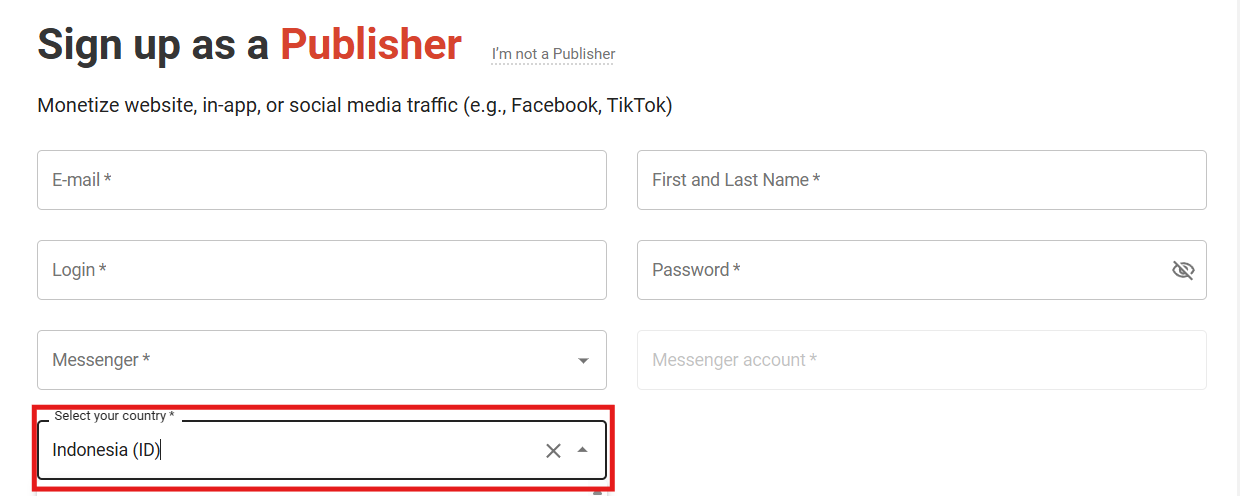
While you register as a Publisher, Adsterra asks you to select your country of residence. Payment systems’ availability depends on this information, so next, you’ll only see the list of methods available in your country. But fear not! If you selected the country by mistake, you’ll be able to change it, and the pay systems will be updated automatically.
Choosing a payment system
Click the Payouts information tab from the vertical menu on the left. If you haven’t previously set a country, you’ll need to select one first, as the list of methods depends heavily on this selection.

Next, you get the list of payment systems available for your country of residence. Find Local Bank Transfers by Hyperwallet.
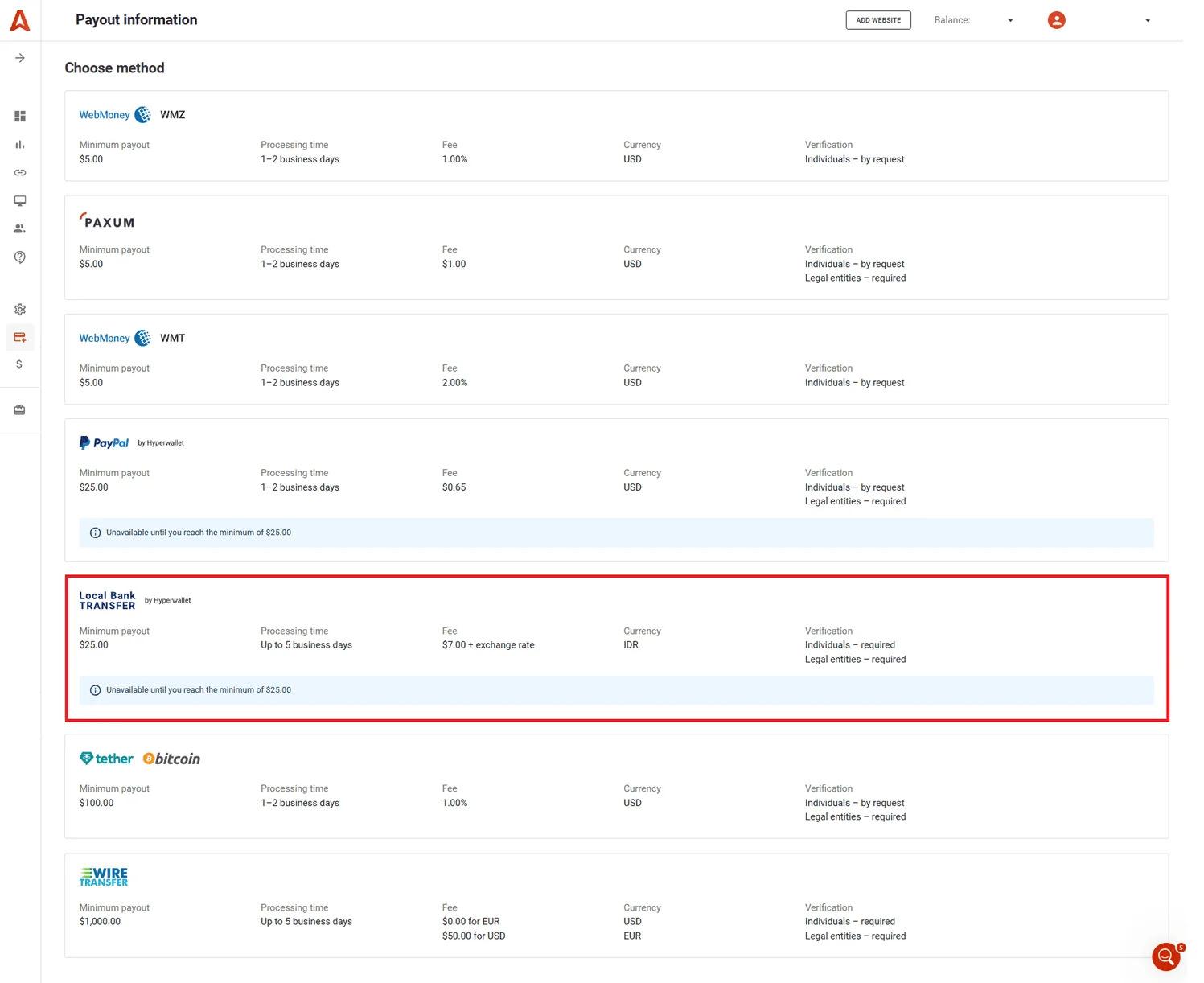
Local Bank Transfers are unavailable until you reach $25 on your account. But today, we don’t need this. We’ll walk all the way as if you’ve hit the minimum.
You’ll need to complete 2 forms laid out as steppers:
- Step 1: Your details. Personal data, address, and minimum payout amount.
- Step 2: Method details. Data required by Hyperwallet.
How the stepper works:
- You can only proceed to Step 2 after successfully completing Step 1.
- You cannot return from Step 2 to Step 1.
Step 1: Your details
First, select your account type (Individual or Legal Entity) to unlock the following fields.
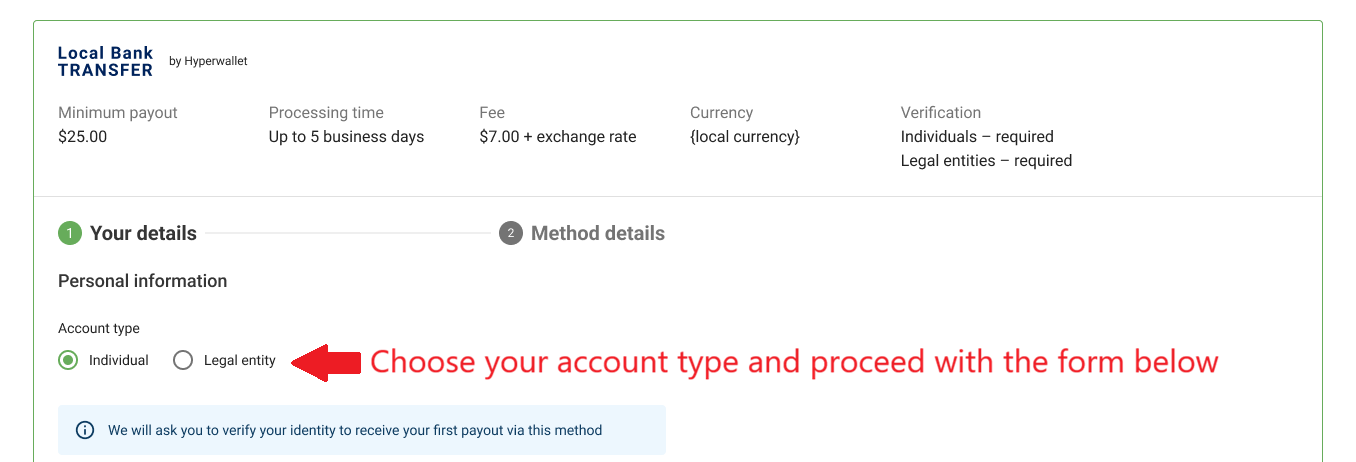
Note: when setting up Local Bank Transfers for the first time or changing crucial information, we will ask you to verify your identity or attach the Certificate of Incorporation. This topic will be covered in the KYC/KYB chapter.
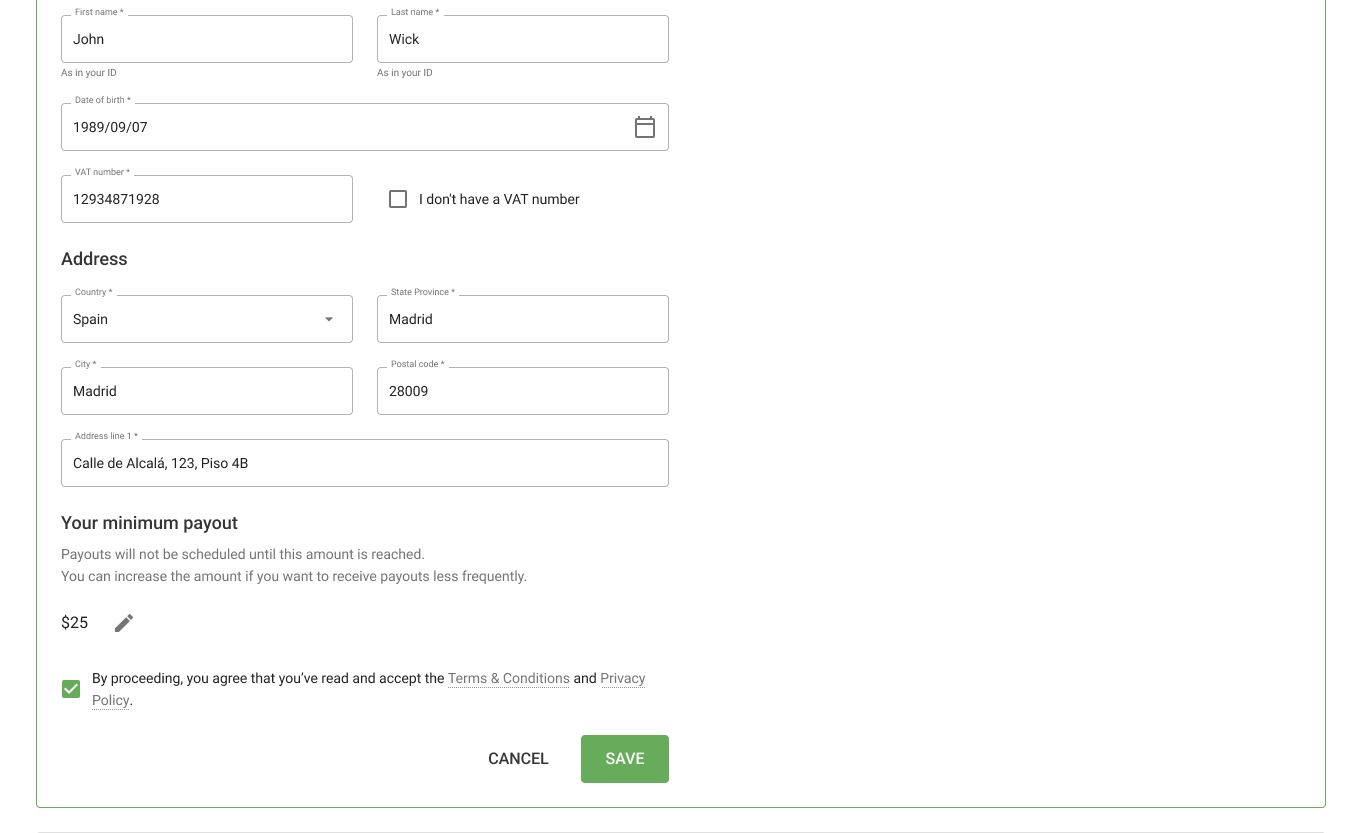
Depending on the account type, fill in the form correctly. If you picked the Individual type, you’ll need to enter:
- First Name
- Last Name
- Date of Birth*
- VAT number (if you have one)
- Country
- State / Province
- City
- Postal (zip) code
- Address line
- Minimum payout amount (if you need to set higher than $25)
Please pay attention to the date-of-birth format (for Individual accounts). It should be YYYY-MM-DD.
For the Legal Entity account type:
- Company name
- VAT number (if in use)
- Country
- State / Province
- City
- Postal (zip) code
- Address line
- Minimum payout amount (if you need to set higher than $25
After filling out the form, click to accept our policies, and then click SAVE.
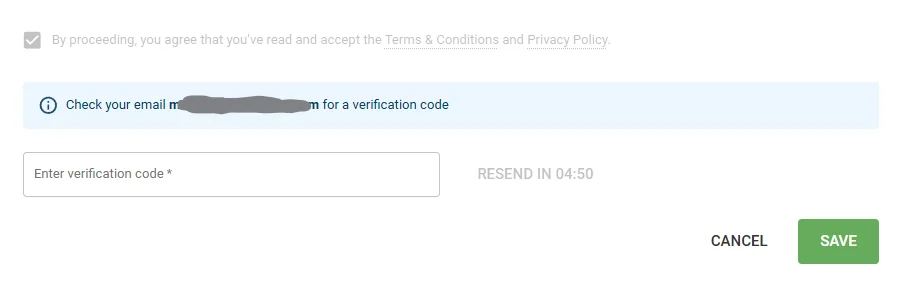
Check the email you entered on registration to find the verification code. Enter the code and click SAVE.
Step 2: Account details
The next step is to enter your bank name and account number. Click SUBMIT when finished.
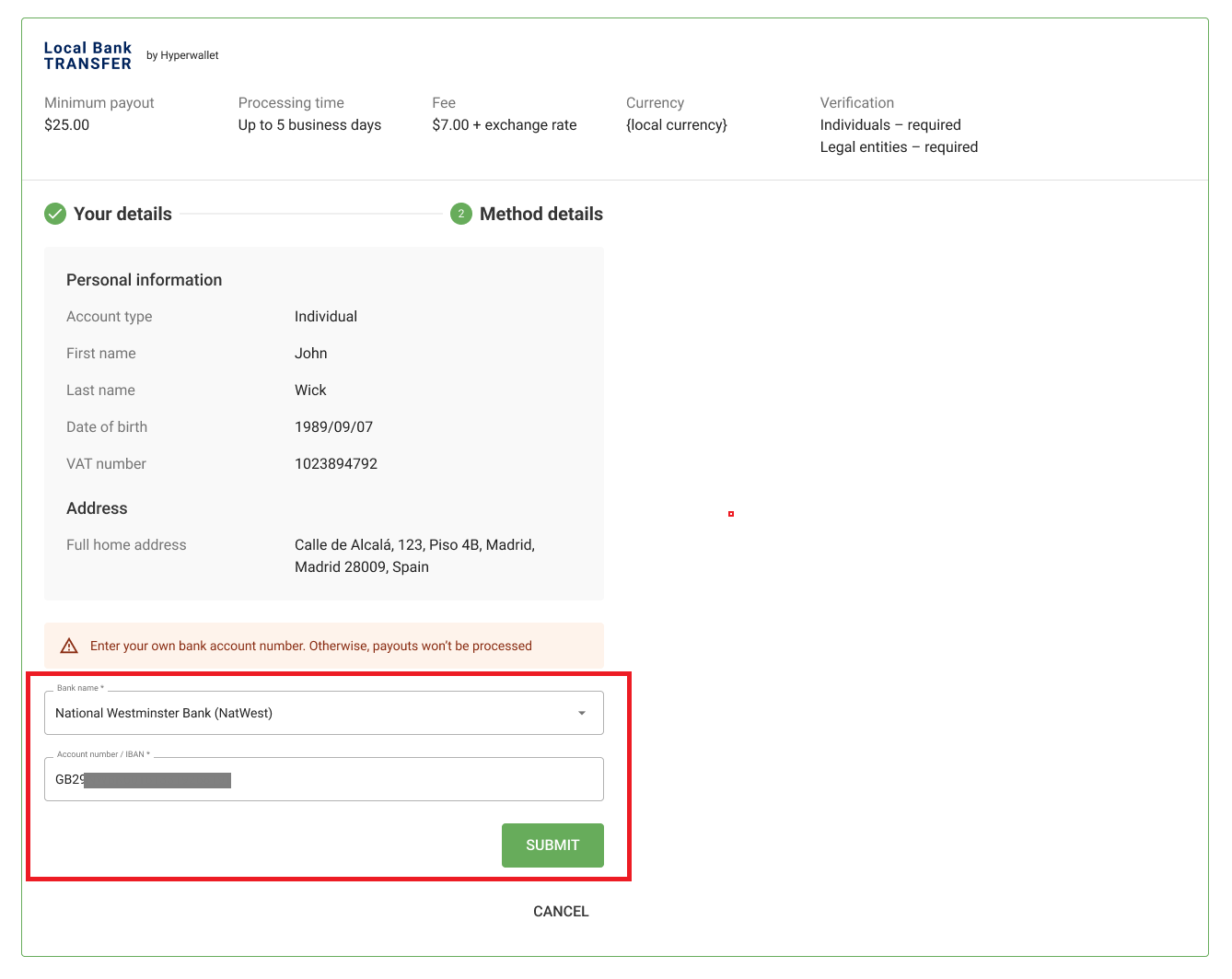
You’ll then see your new payment method with all details added. If you want to edit data, click the Edit icon and make corrections. Follow the instructions to update the information appropriately.
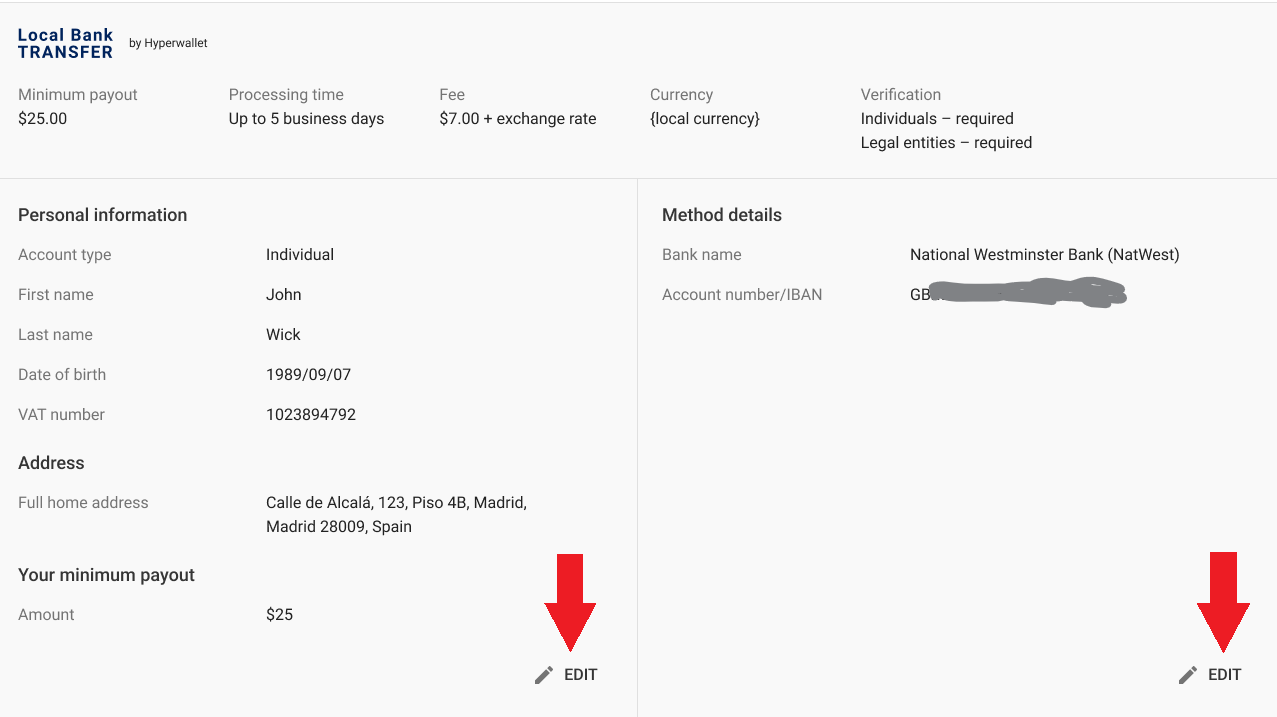
Please note that any changes are disabled on payment dates to avoid transaction breaches. We’ll notify you about this period.

How to start getting paid in local currency?
You’ve just walked through the Local Bank Transfer setup. But how do you start getting payouts? This will require completing the KYC/KYB process, or your identity verification.
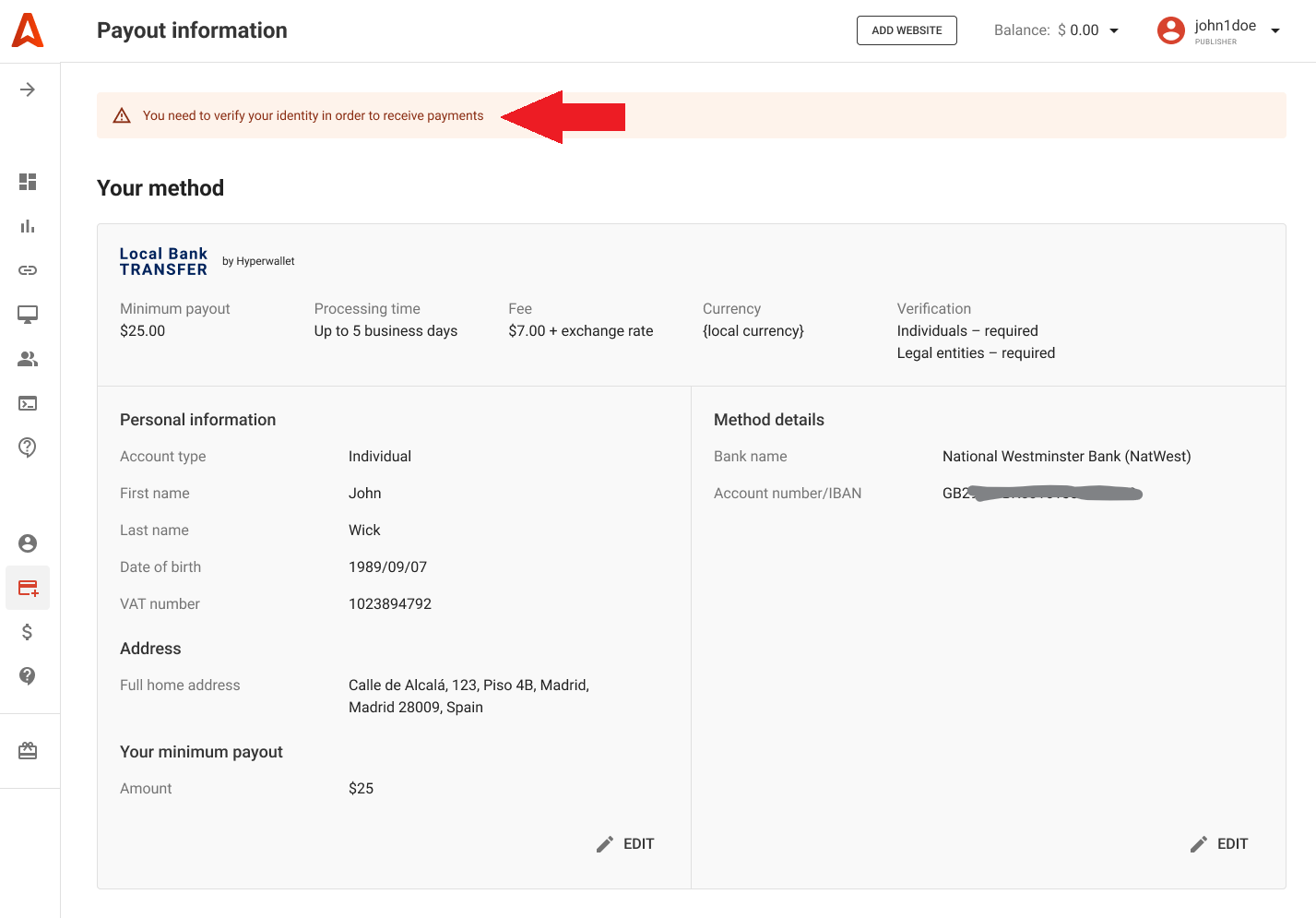
KYC stands for Know Your Customer, while KYB stands for Know Your Business. These are necessary processes of identifying and verifying a client’s identity. In simpler terms, banks must verify that their clients are who they claim to be.
Usually, it’s processed in minutes, but you must ensure you have uploaded the correct documents. So let’s set aside some time for this and lay out all the details.
Documents accepted to pass KYC
To verify your identity, you’ll need to provide one of these documents in English:
- a photo (not a scan) of your national ID / passport / residence permit / driving licence (for the US and Canada only).
If you can’t provide documents in English, contact our Customer Care team. Our managers will examine each case individually.
KYC for Local Bank Transfers: a short guide
Go to the Payouts page, scroll down till the Documents section, and click the UPLOAD DOCUMENTS link. Select Passport / ID Photo.

On the popup, choose ID Card from the dropdown. Then, select a file (for two sides of the document) and click UPLOAD.
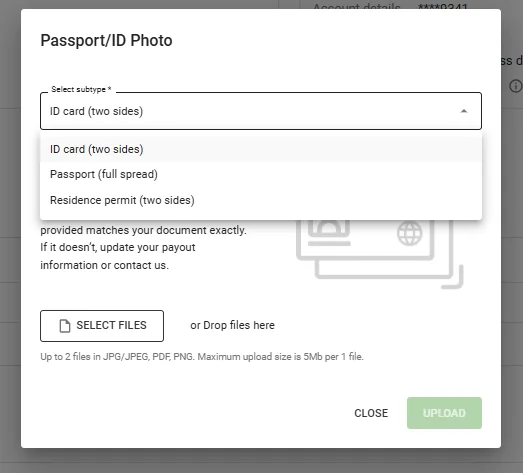
Upload documents in English only. Make sure that your profile’s Payment info exactly matches your document.
That’s it! Please wait for your ID Photo verification and check its status on the Payouts page. Just in case, we posted a complete guide to passing KYC, covering all issues and solutions.
KYB for Local Bank Transfers: a short guide
Go to the Payouts page, scroll down till the Documents section, and click the UPLOAD DOCUMENTS link. Select Certificate of incorporation from the dropdown:

Enter your registration number, then select a file and click UPLOAD.
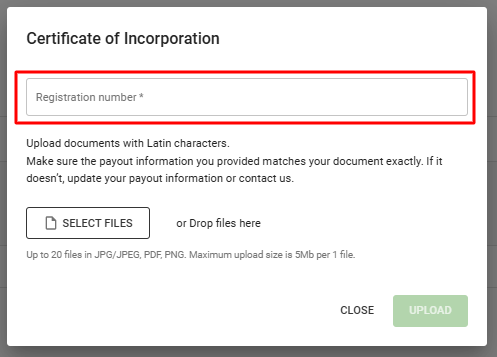
The verification will proceed on the payout date. You’ll be able to check the status on the Payouts page. Verification statuses and common issues are listed in the KYB guide for publishers.
Сountries where banks support payouts in local currency
Hyperwallet cooperates with multiple banks, allowing publishers to withdraw payouts in local currencies in 45 countries. We’re now going to list them all, naming the currency supported. But to get updates, we recommend that you check our Help Center.
| Country | Currency |
| Argentina | ARS |
| Australia | AUD |
| Bangladesh | BDT |
| Brazil | BRL |
| Bulgaria | BGN |
| Canada | CAD |
| Colombia | COP |
| Czech Republic | CZK |
| Denmark | DKK |
| Dominican Republic | DOP |
| Gibraltar | GBP |
| Greenland | DKK |
| Guernsey | GBP |
| Hong Kong | HKD |
| Hungary | HUF |
| India | INR |
| Indonesia | IDR |
| Isle of Man | GBP |
| Israel | ILS |
| Jamaica | JMD |
| Japan | JPY |
| Jersey | GBP |
| Liechtenstein | CHF |
| Malaysia | MYR |
| Mexico | MXN |
| Morocco | MAD |
| Nepal | NPR |
| New Zealand | NZD |
| Norway | NOK |
| Pakistan | PKR |
| Peru | PEN |
| Philippines | PHP |
| Poland | PLN |
| Republic of Korea | KRW |
| Romania | RON |
| Singapore | SGD |
| Sri Lanka | LKR |
| Sweden | SEK |
| Switzerland | CHF |
| Thailand | THB |
| Tunisia | TND |
| Turkey | TRY |
| United Arab Emirates | AED |
| United Kingdom | GBP |
| Vietnam | VND |
Other payment systems for Adsterra publishers
Adsterra publishers get paid in several user-friendly ways:
- PayPal
- WM (minimum payout is $5)
- Paxum (minimum payout is $5)
- Wire transfer
- Cyber currencies (check the list in your account)
- Local Bank Transfer by Hyperwallet
What’s next?
We believe that withdrawing payouts in local currency directly from your Adsterra account will simplify the path to real earnings. It removes headaches caused by currency conversion and the extra steps publishers had to go through before.
Register or log in now and explore your powerful workspace. To learn more about your benefits as a website owner (Publisher), read this guide to Instant Monetization with Adsterra. To check all monetization ad formats, read through this guide to the highest-paying display ads.