Social Bar for publishers is a revenue-driving ad format you can place to even mobile-first websites to monetize traffic. In this guide, Adsterra Head of Publishers Support, Victoria, will walk you through the basics of Social Bar monetization. You will learn how to put ad codes on websites with no hassle and start getting higher profits.
What is the Social Bar monetization format?
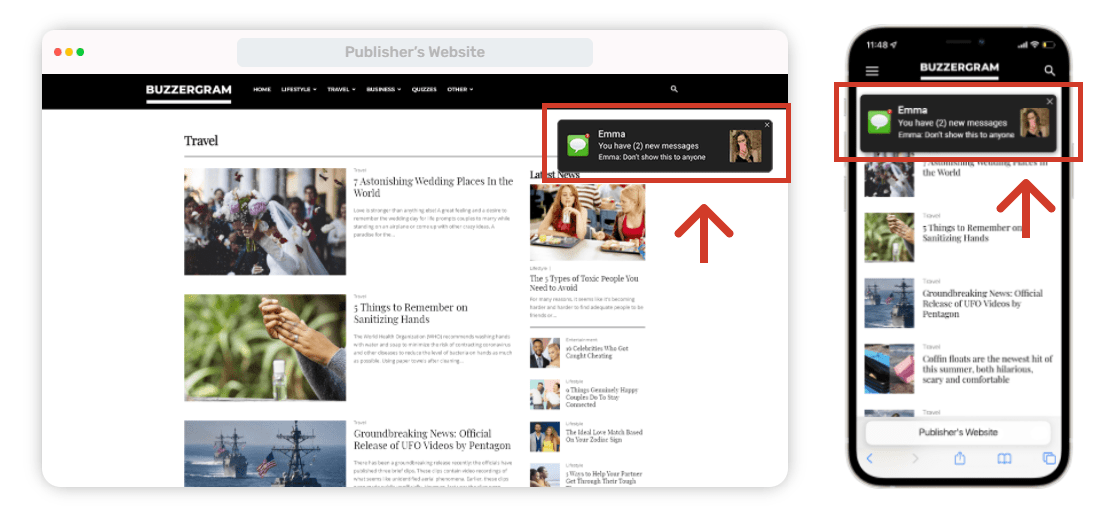
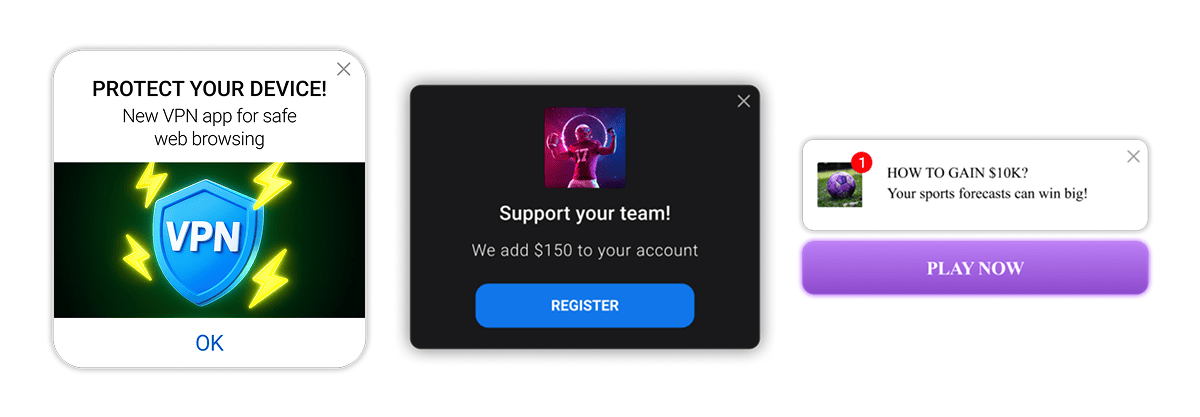
Social Bar is an innovative ad format for publishers that helps you generate more money from website traffic. By design, it’s an easy-to-install display ad unit. It embraces several visual designs that look like friendly notifications, icons, overlays, or widgets. Audiences of all ages demonstrate high engagement and loyalty to such ads, as they’re safe, neat, and friendly.
The key to high CPM rates for publishers
Social Bar is programmed to show different ads in turn, meaning each user will see different advertising offers, all of which will be relevant. The “Social” component is the secret sauce: ads can look like social media signals, push notifications, interactive elements, chats, or Stories that provoke tons of clicks. High engagement boosts views, clicks, and revenues.
Main advantages of the format
Publishers don’t need to look for the top spot as they did with banners or native ads. Social Bar will appear like a push notification or a pop-up widget. But unlike pop-ups, it won’t block web content (thanks to dynamic iFrame technology), making it more usable and effective.
How Social Bar differs from banners and web push ads
Web push ads appear on users’ devices (user subscription required). Social Bar units don’t depend on browser subscriptions. So, all your visitors will see them, and you will monetize all your traffic.
The format works like in-page ads. In-Page Push ads are non-intrusive and do not require user subscriptions or opt-ins, making them highly accessible to all visitors, unlike other ad types. Social Bar ads are resistant to ad blockers, enabling publishers to monetize 100% of their traffic without losing impressions. Also, the ad code is lightweight; it doesn’t affect the load speed.
Want to start with Social Bar?
Sign up to Adsterra and copy/paste the ad code to your web page.
Or ask our managers to help you out in the live chat!
Why Social Bar monetization returns high CPMs
Social Bar serves the most relevant ads and great CPMs. Mainly because of these reasons:
1. Well-paying advertisers
Entertainments and E-commerce brands use high-engaging ads it for seasonal sales, software platforms boost clicks with push alerts, gaming advertisers promoted browser games adding dynamic designs and engaging content. A stable flow of ad offers from Tier 1 to Tier 3 is what you can expect today.
2. Outstanding CTRs that impact CPM rates
The click-through rate is an important marker of traffic performance. You might have loads of visitors and ad impressions, but if they don’t convert into clicks, advertisers can lower your CPMs (the cost per 1,000 impressions).
Social Bar ads can achieve click-through rates (CTRs) that are up to 30 times higher than traditional web push, significantly boosting CPM rates for publishers thanks to engaging designd.
You can track all key statistics and optimize traffic sources for better results! See how your CPM changes, how many clicks your traffic streams, and which GEOs are true profit makers on your Statistics Dashboard.
3. Ads are friendly, highly viewable, and engaging
Banner blindness is a serious barrier to getting larger profits. Users, especially younger digital-natives, lean to advanced experiences. Social Bar creatives include engaging techniques used by most social networks: signals, vibrant elements, and notifications. Positive vibes are something every user is looking for.
In-Page Push ads are non-intrusive and do not require user subscriptions or opt-ins, making them highly accessible to all site visitors.
Social Bar monetization examples
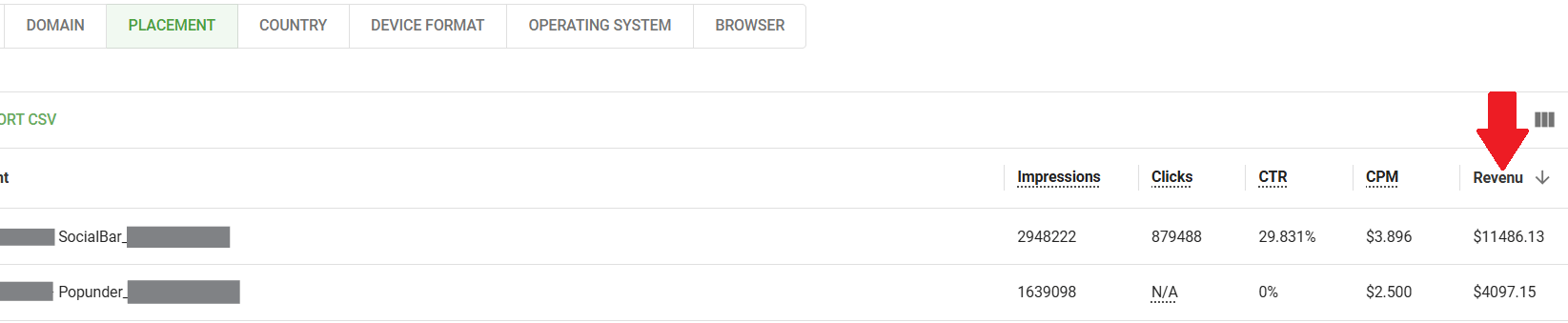
Bloggers share impressive results of making $7,000 on news websites after adding Social Bar. They often advise a strategy of using this ad unit as an extra source of income alongside Popunders. Publishers who integrated this ad unit enhanced ad revenues by at least $1,000, like this team of bloggers from Pakistan. Their CPM stayed at the $1-$2 level, allowing them to steadily grow profits.
Our partners drive traffic from Indonesia, India, Pakistan, Japan, Singapore, the US, and more geos. Thanks to highly customizable ads, they generate more clicks and further conversions. In general, publishers can earn between $100 to $1,000 in just one week using Social Bar ads, depending on their traffic and engagement levels.
The highest profits come from Entertainment, Movies, Streaming, MP3, URL shorteners, File Converters, and social media traffic. A publisher owning an entertainment site has earned over $11,000 with Social Bar in just 30 days, driving traffic of the EU target audiences. CPMs compete with Pop ads, staying $3.7-3.9 on average.
The CPM-boosting Interstitials
A true market hit, the Interstitial format is at the peak of advertiser demand. They need more traffic each day, so every site owner has a chance to supercharge profits.
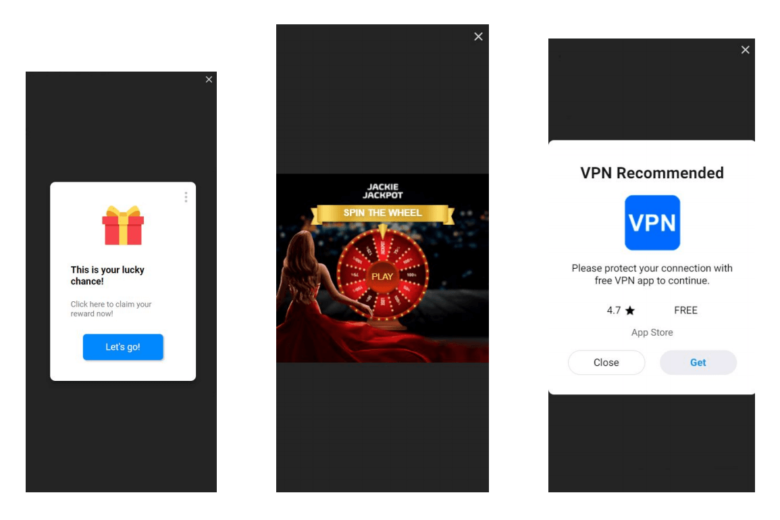
Apply for Interstitials in the live chat
Our managers are online 24/7
A guide to getting started with Social Bar monetization
This guide would not be complete without giving any instructions on how publishers can install Social Bar and start monetizing traffic. Here is the neat how-to flow.
- To access all Adsterra ad formats, please, sign up as a publisher. When signing up, you will need to verify your email before your account is created.
Enter your account and click any of the ADD WEBSITE buttons.
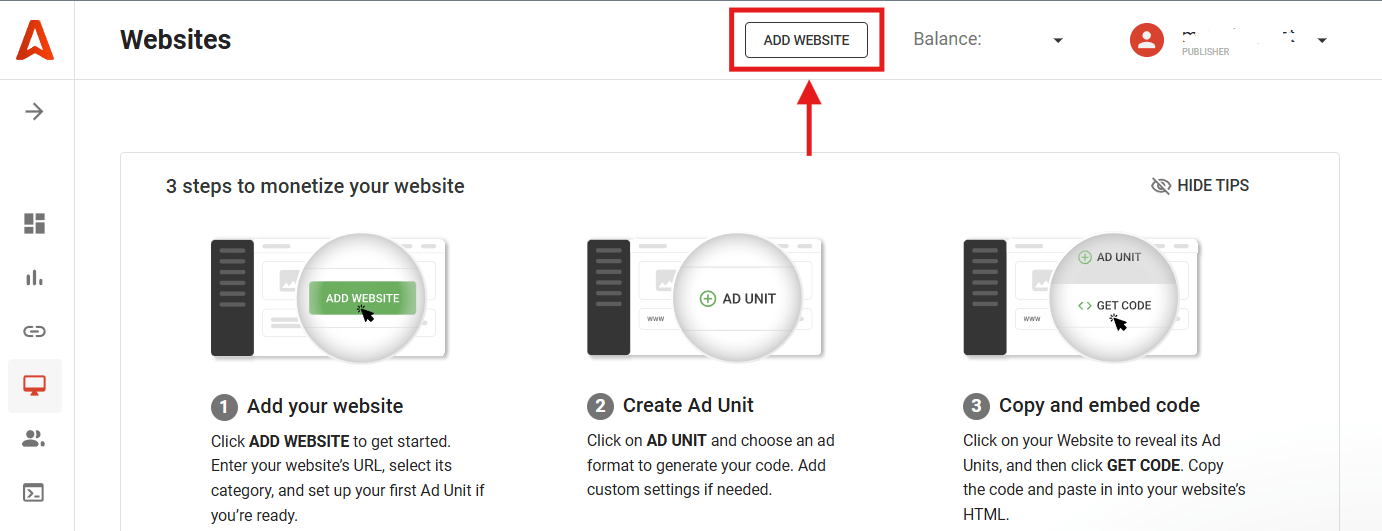
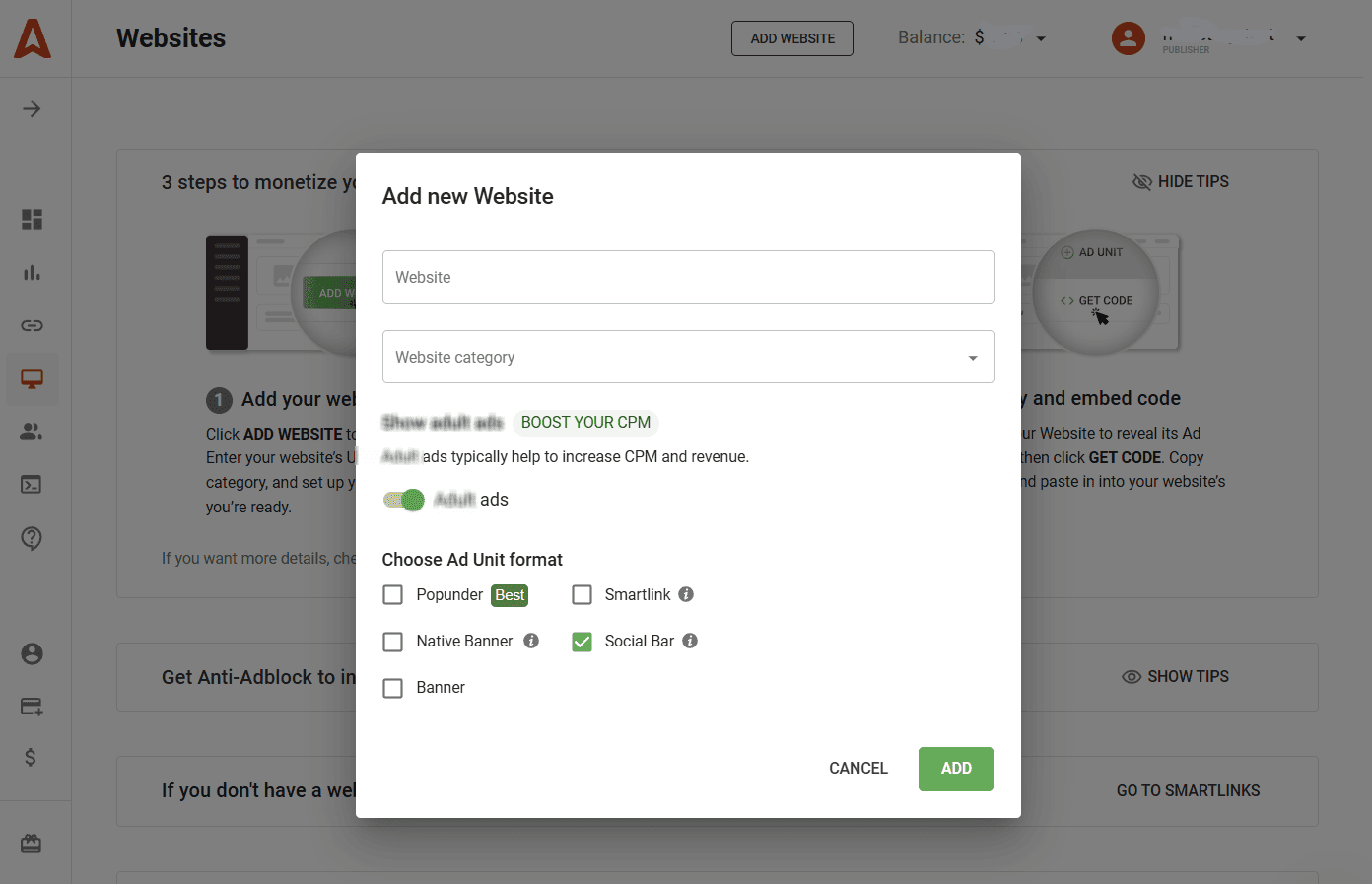
In the pop-up window, fill in the fields required. You will need to enter your domain name. Also, select the category (what your content is about). It will help our algorithms to send you the best-matching ads.
Fill in the fields required (domain, category) and either switch the toggle to show all ad types, or keep it OFF.
Pick Social Bar in the Choose Ad Unit format field to create a new script.
Click ADD.
Go to the Websites page. Your newly added domain will be set to Pending Status. Wait until we verify it (usually it takes a couple of minutes). When verified, the status will change to Approved. Click Refresh if needed.
After you see the Approved status, click the domain and copy your Social Bar script. Be sure to follow the instructions; you will need to paste the code before the “</body>” tag on your web page.
! Sometimes, you don’t see the Pending status change to Approved. Then check your email. If the website is approved, we will email you the ad codes.
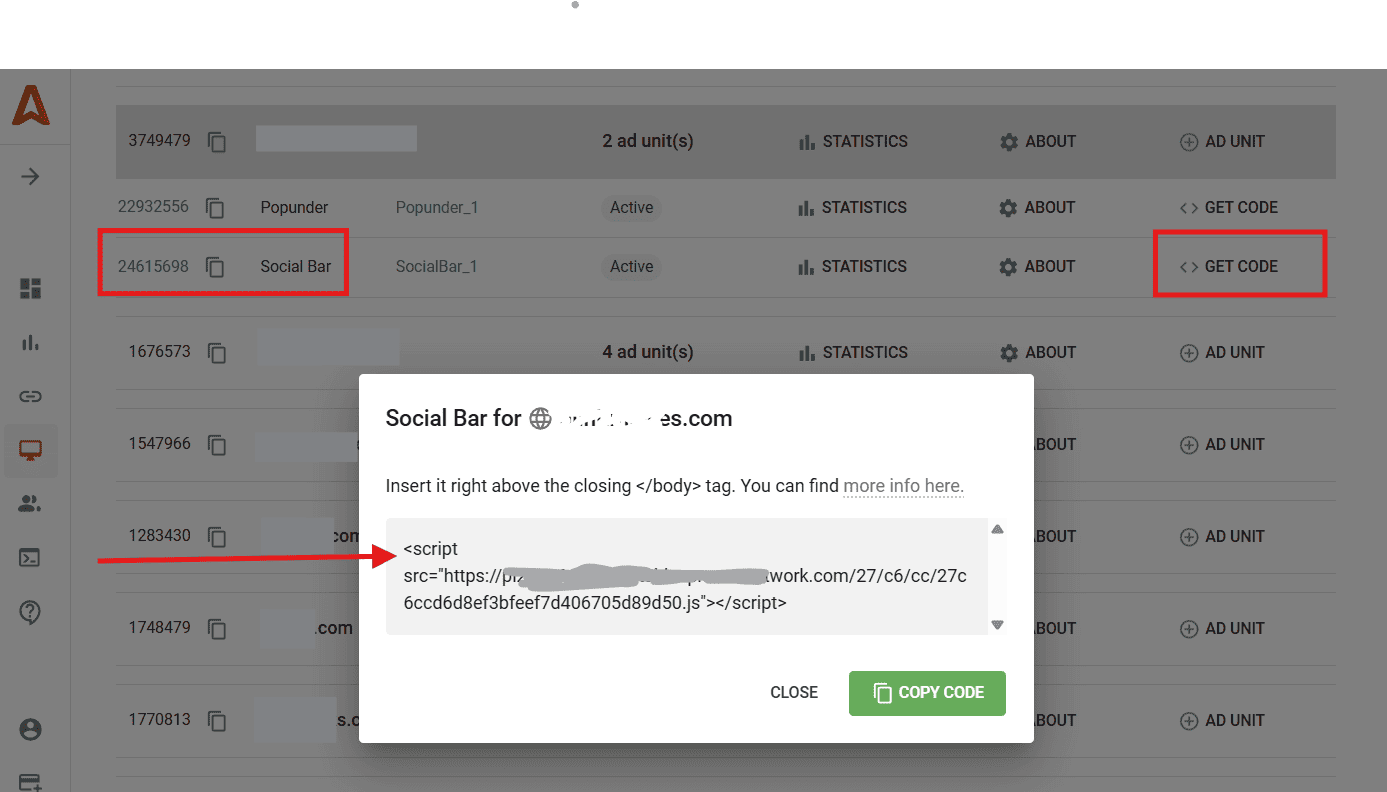
How to generate the Social Bar script for a previously added website
Find your domain on the Websites tab. Then click the +Ad Unit icon and pick Social Bar. Copy and paste the script after getting the code.

How to put Social Bar scripts on a website
Please remember to put the ad code right above the closing “</body>” tag. You will need to open the HTML view of the layout where you want to place ads.
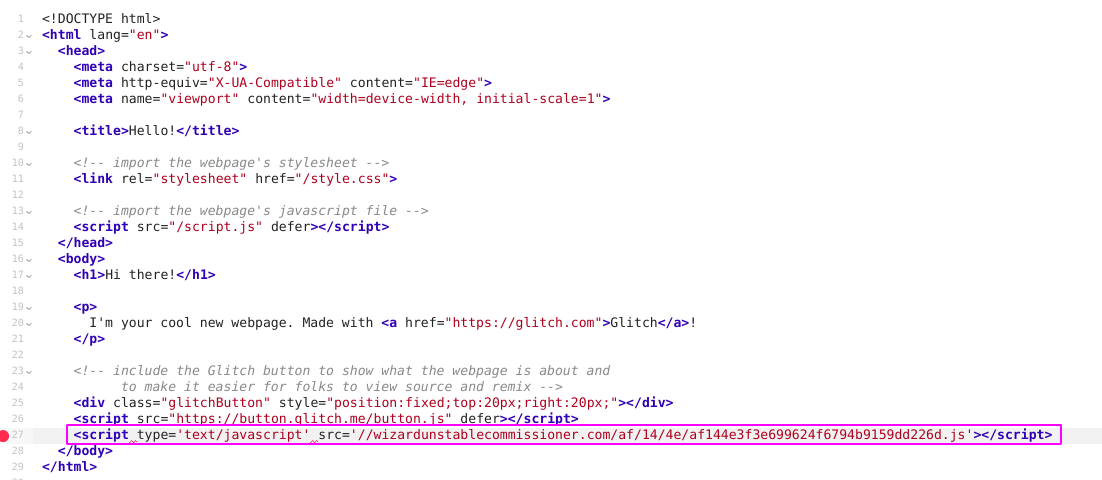
Press Ctrl +F (Win) or Control+F (Mac) and type in the search window “/body”. You will see a piece of code on your website that looks something like the picture below. Put the copied ad code right before this tag.
Adding Social Bar to a WordPress website
There are two ways of adding Social Bar codes to a WordPress-based website. You can either expose it on all pages or choose an exact placement.
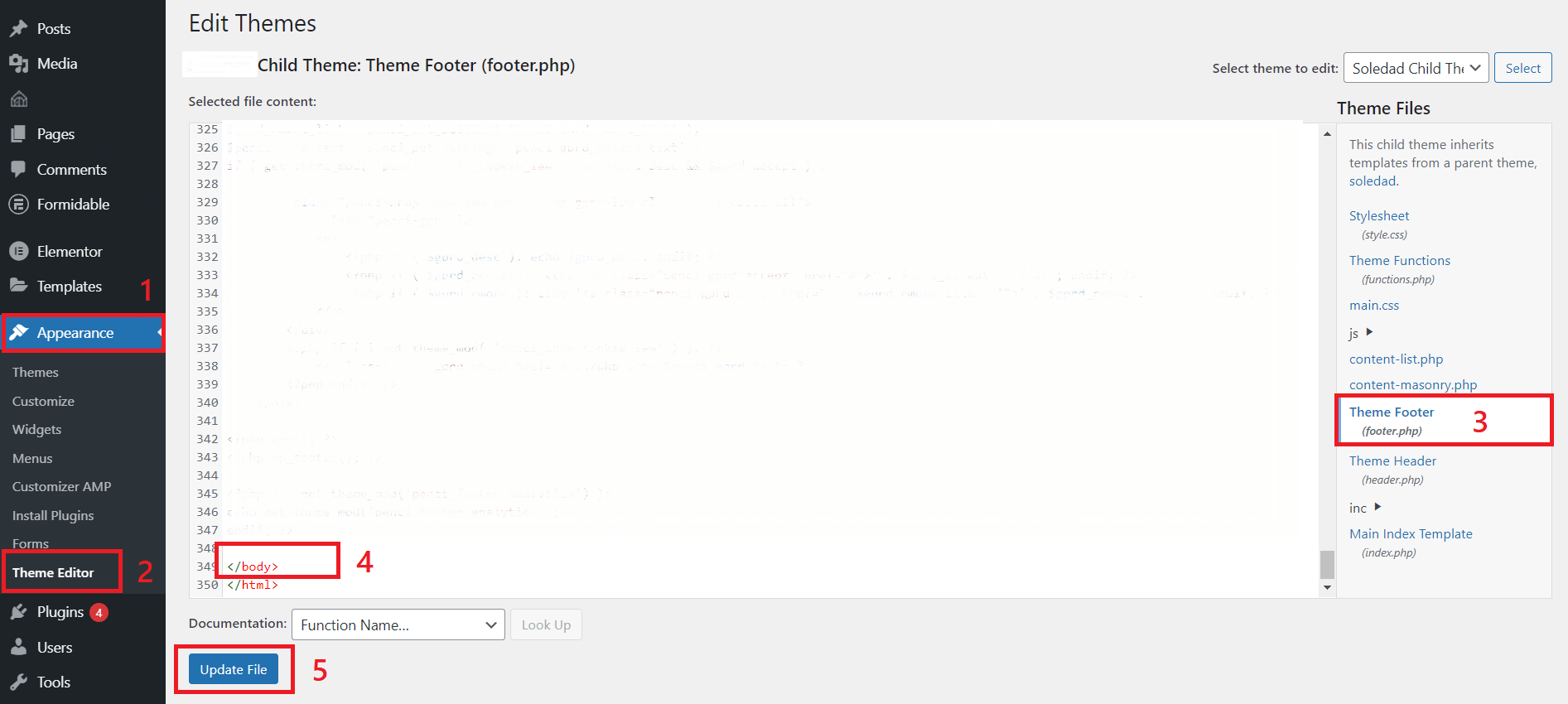
To install the code to every page, you will need to edit the Theme. Go to the Appearance section and choose Theme Editor. You will see the list of theme files (Theme Footer, Theme Header, Main Index template, etc). Your choice is Theme Footer cause it’s where the “</body>” tag is.
Add the code before the “</body>” tag.
You can also put Social Bar with Custom widgets
- Click Appearance and pick Widgets.
- Select the ‘Custom HTML’ widget and choose between several types of theme widgets.
- Click Add Widget and paste the Social Bar code inside.
- Click Save.
This short video will help you out.
Place Social Bar scripts with Elementor
Elementor is a visual editor designed for WordPress. With this editor, you can place Social Bar code as HTML to any page or post. That’s how to easily do that.
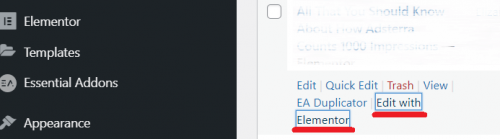
1. Add a new post or click ‘Edit with Elementor’ (hover the mouse over the name of the page to see this option).
2. On the panel with Elements, select GENERAL and find HTML.
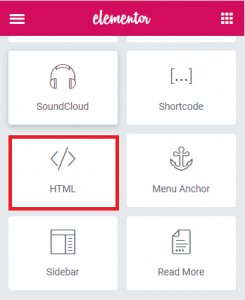
3. Drag and drop the HTML element to your page.
4. Insert your HTML code directly into the HTML Code box.
5. Click UPDATE (if you’re editing an existing page) or PUBLISH if you’re creating a new one.
Need more detailed tutorials?
We’ve made them for you! Definitive step-by-step guides with short video instructions are always here, in the Publishers’ Help Center. Enjoy!
Put Social Bar on a WordPress-based website, page, or post
Place ad codes on Blogspot (Blogger-based) websites
Add codes with Elementor visual editor
Use advertising codes with CloudFlare
How to change the Social Bar’s location and its frequency
When you need your Social Bar to stick to a specific location of the web page, please don’t change the recommended location of the ad code. Get in touch with our managers via the live chat icon, and they will help you out.
Avoid adding several codes to the same page, cause this won’t increase the number of times users see ads. Tell our manager how often you want your visitors to see ads, and they will make all necessary settings.
Monetize your website with Social Bar: more benefits for publishers and webmasters
Let’s sum up the benefits publishers can enjoy (and profit from) by putting Social Bar on their websites. We have already mentioned the CPM-boosting capacities of the format. So let’s focus on WHAT makes it possible:
You capitalize on every ad impression, as no browser subscription needed.
Native & non-disruptive ads elegantly fit any website interface.
A single line of lightweight code is needed. A truly instant Social Bar monetization.
Social Bar alone can bring you profit equal to that from multiple ads.
Higher CTRs drive higher CPMs.
The AI-powered optimization algorithm serves your visitors the most relevant adverts.
An ultra-demanded Interstitial format can boost your earnings even more!
Add a new income source today!
Social Bar monetization FAQs:
How does Social Bar for publishers work?
Social Bar includes five different ad types: In-Page Push, Interstitial, Icon Notifications, Custom Banner or Widget. They appear in turns, not cluttering your web layout. Some formats overlay the screen (Interstitial), having a “close” button. Other ad formats utilize interactive chat windows to engage users and direct them to an advertiser’s page, enhancing user interaction. You only take one script, paste it to your pages, and ads start rolling.
How do I earn from Social Bar ads?
Adsterra offers multiple pricing models for advertisers, including CPM, CPC, and CPA. They pay publishers for ad views, clicks, and conversions on an eCPM basis.
Can I choose where ads appear?
Publishers can change the appearance and frequency of Social Bar impressions through their personal manager at Adsterra. Advertisers have more customization options. Social Bar ads can be customized in various ways, including changing the call-to-action, color scheme, and icon size or position.